


Non-EU steel, aluminium, cement and fertiliser producers keep getting the same message from their EU customers: “please register in the CBAM Registry”. Many start the process, hit an error message, and stop. Verifiers with a fresh CBAM accreditation run into a different surprise: being accredited does not yet mean they can submit a single report.
Both groups work in the same place: O3CI, the CBAM Registry module for operators of installations outside the EU. This guide explains who uses it, what to prepare, and the steps for operators and verifiers, based on the Commission’s manuals published in August 2026 and the verifier access procedure that applies from 1 September 2026.
Answer capsule
O3CI is the CBAM Registry module for non-EU installation operators and accredited verifiers. Operators register installations and emissions data; verifiers review evidence and issue reports; declarants retrieve shared data. Access requires EU Login, 2FA and role-specific documents.
Who uses which module
The CBAM Registry has three entry points. Using the wrong one is the first common mistake.
| Module | Who uses it | What it is for |
|---|---|---|
| Authorisation Management Module (AMM) | EU importers and indirect customs representatives | Applying for and managing authorised CBAM declarant status |
| DRMC | Authorised CBAM declarants | Overview of imports, emissions, certificates and obligations; the annual declaration |
| O3CI | Non-EU installation operators and accredited verifiers | Registering installations, recording emissions data, verification and sharing data with declarants |
O3CI is intended only for installations outside the EU. EU-based operators do not use it.
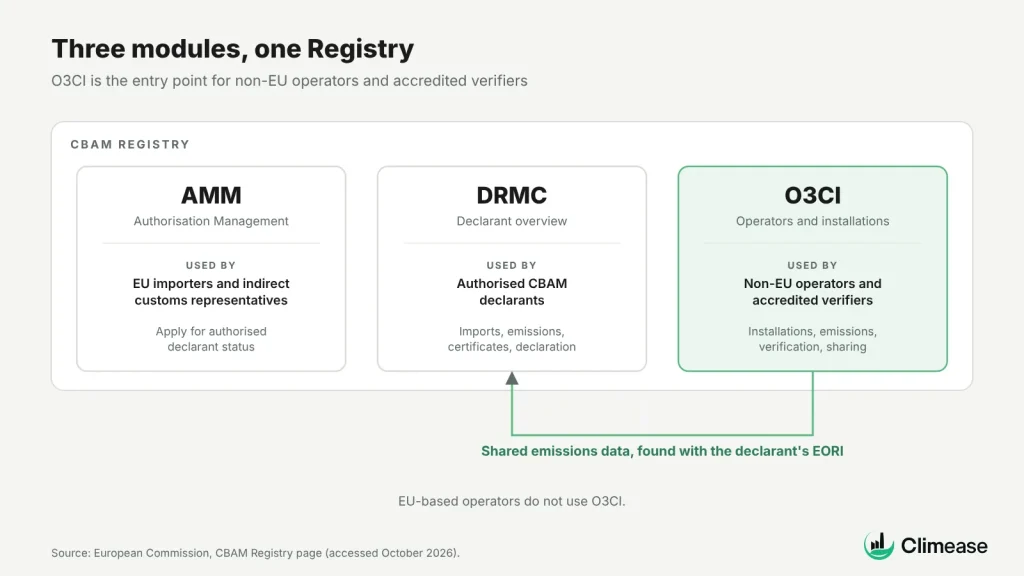
The benefit for operators is simple: you upload installation and emissions data once and share it with every EU customer, instead of filling in a different template for each importer. The Commission also designed the portal to keep business-sensitive data confidential.
Before you start: EU Login, 2FA and documents
Every person who will use O3CI needs their own EU Login account. Use a company email address, and set up two-factor authentication before you try to access the Registry. For operators and verifiers, three 2FA methods are available: the EU Login mobile app, a QR code or a FIDO2 security key.
Then prepare one PDF with the supporting documents, ideally in English, with a courtesy translation next to any original in another language. The file must not exceed 5 MB.
| Operator documents | Verifier documents |
|---|---|
| Company registration certificate, with a registration number that matches the form | CBAM accreditation certificate |
| Proof of authority to represent the company, such as a power of attorney | Company registration documentation |
| ID of the authorised representative | Proof of authority to represent the company |
| ID of the authorised representative |
The operator path
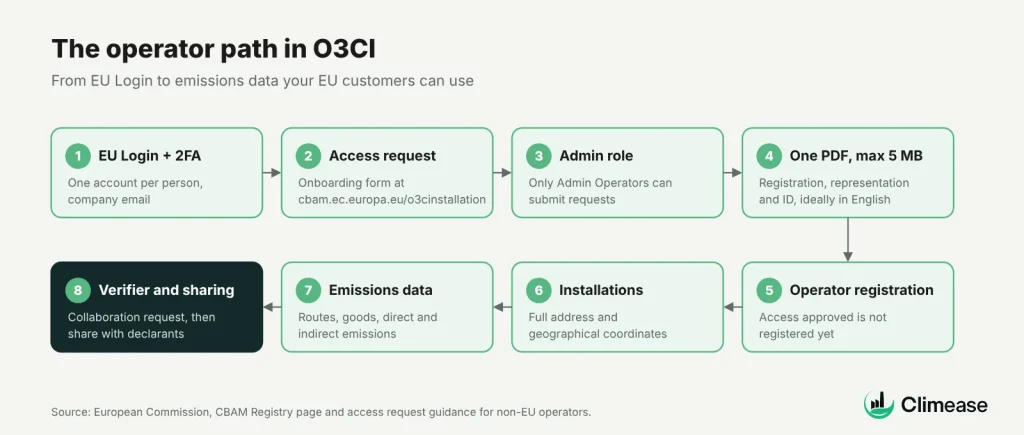
- Create your EU Login account and set up 2FA.
- Request access in the O3CI portal at cbam.ec.europa.eu/o3cinstallation. Choose “Request an EU Access profile” and complete the onboarding form: legal name, legal person, third-country operator, company address, corporate email, company identifier and country code.
- Choose your role. An Admin Operator can submit requests to the Commission. A Simple Operator can only save draft requests. Make sure at least one person in the company is an administrator.
- Attach your single PDF and submit. A Commission administrator reviews the request. Approval can take several days; check your spam folder if you hear nothing.
- Register as an operator and add your installations. Approval gives you access to the portal; it does not register your company yet. Submit the registration request in O3CI, including the location of each installation with full address and geographical coordinates.
- Record installation and emissions data for each installation: production routes, goods, direct and indirect emissions and any carbon price paid in the country of production. The Registry checks format and plausibility, but a saved record is not a verified record.
- Connect with your verifier by sending or accepting a collaboration request, so the verifier can review your data and evidence.
- Delegate access to employees if needed, following the Commission’s delegation guide of June 2026.
The verifier path
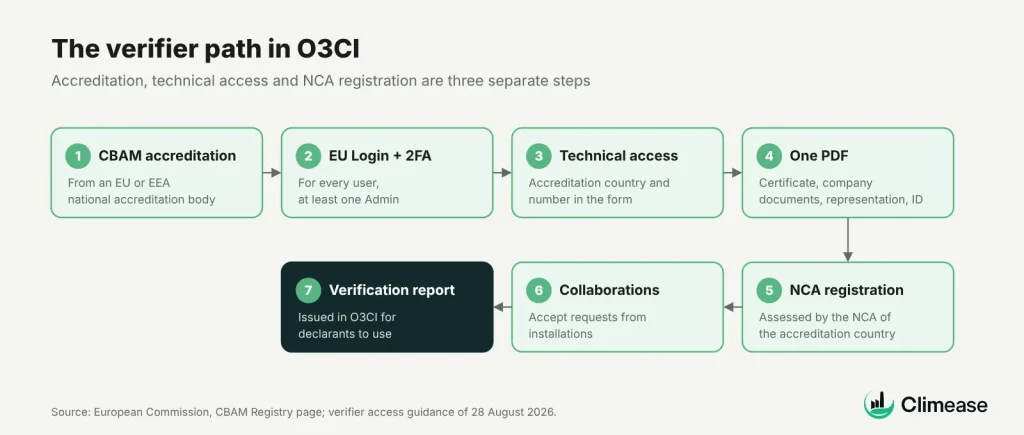
- Obtain CBAM accreditation from an EU or EEA national accreditation body. Nothing in O3CI replaces this step.
- Create EU Login accounts for the people who will use the portal, with 2FA.
- Request technical access in O3CI. The form asks for your accreditation country and number, company details and the user role: Accredited Entity Admin User and/or Accredited Entity Simple User.
- Attach your single PDF with the accreditation certificate and company documents, and submit.
- Apply to become a registered accredited verifier. This is a separate request inside O3CI, assessed by the national competent authority of the country where you are accredited. Technical access alone does not make you a registered verifier.
- Accept collaboration requests from the installations you will verify. Only administrators can submit registration and collaboration requests.
- Review data and evidence, and issue the verification report in the portal, so declarants can use the verified emissions.
The Commission published dedicated guidance for verifiers on 28 August 2026, together with a quick guide on requesting technical user access.
How emissions reach the declarant
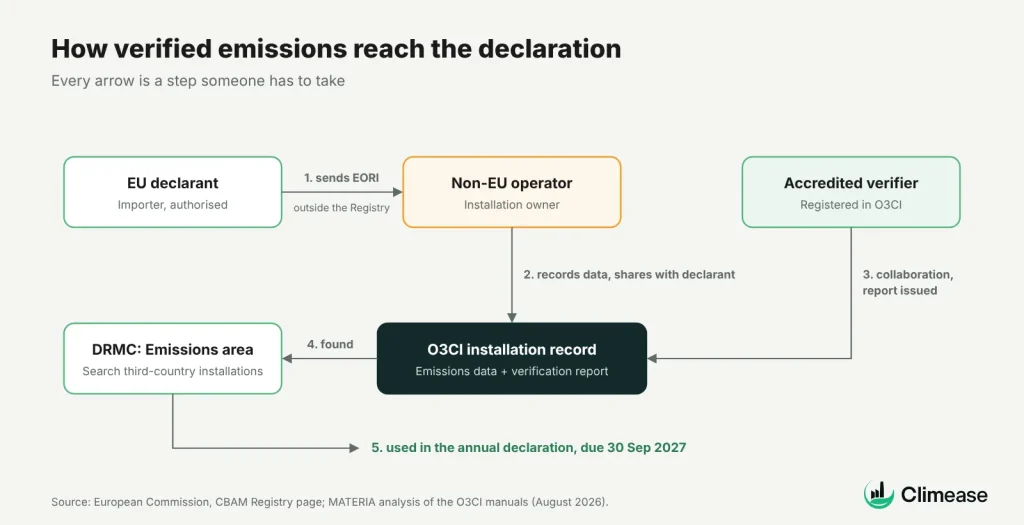
Verified data only helps if the right EU customer can find it.
- The declarant shares its EORI number with the operator outside the Registry. Without it, the operator may complete its records but cannot link them to the right customer.
- The operator shares its installation data with that declarant in O3CI.
- The declarant searches the third-country installations registry from the Emissions area of its own portal and pulls the data into its declaration.
For importers, this means one simple action today: send your EORI number to every CBAM supplier, together with your request for verified emissions.
Common access errors and how to fix them
| Problem | Likely cause | Fix |
|---|---|---|
| Validation error blocks submission | Identifier format, legal name over 70 characters, wrong person type or invalid email or website | Start the identifier with the ISO-2 country code, keep it under 25 characters, and check every field format |
| Request saved but never submitted | User has the Simple role | Ask an Admin user to submit, or request the Admin role |
| Request rejected | Documents missing, unreadable or not matching the form | Read the justification in the rejection email, fix the documents and restart |
| Long wait with no answer | Review takes several days, or the email went to spam | Check spam, then contact the Commission service desk with a screenshot and timestamp |
| Verifier can log in but cannot verify | Technical access approved, NCA registration not done | Submit the registration request to the NCA of the accreditation country |
| New verifier cannot connect | Previous collaboration still active | The operator removes the old collaboration first; only one can be active at a time |
| Declarant cannot find the data | EORI not shared, or data not shared with that declarant | Exchange EORI numbers and check the sharing settings |
For technical issues, the Commission service desk takes requests in English at [email protected]. Include the page address, a screenshot of the error and the time it occurred.
O3CI onboarding checklist
For operators
- ☐ Every user has an EU Login account with 2FA.
- ☐ At least one person has the Admin Operator role.
- ☐ Registration certificate, proof of representation and ID merged into one PDF under 5 MB, in English or with translation.
- ☐ Company identifier starts with the country code and matches the form.
- ☐ Each installation has a full address and geographical coordinates.
- ☐ EORI numbers collected from every EU customer.
- ☐ Verifier chosen and collaboration request ready.
For verifiers
- ☐ CBAM accreditation certificate from an EU or EEA NAB.
- ☐ EU Login and 2FA for every user, with at least one Admin user.
- ☐ Technical access to O3CI approved.
- ☐ Registration request submitted to the NCA of the accreditation country.
- ☐ Process ready to accept collaboration requests and issue reports.
The bottom line
The CBAM Registry is where verification becomes usable. Operators need an approved O3CI account, registered installations and data shared with the right customers. Verifiers need accreditation, technical access and NCA registration. Declarants need to share their EORI number and know where to look. If one link is missing, verified emissions never reach the declaration, and default values apply.
Need help getting suppliers onto O3CI? ClimEase works with non-EU operators on Registry onboarding, monitoring and verification readiness, and tracks the status of every installation in your portfolio. Book a 30-minute call.
Related reading: How to choose a CBAM verifier · CBAM verification in 2026 · Actual vs default emissions under CBAM
Sources: European Commission: CBAM Registry · Commission guidance on the access request procedure for non-EU operators
Abonnieren Sie unseren Newsletter